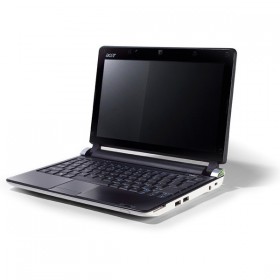
Acer Aspire One D250 Netbook Windows XP Drivers

Aspire One D250 Just 1" thin and feather-light at 1.18 kg, the 10.1" Aspire one D250 is the ultimate take-me-with-you device! The 10.1" LED-backlit display presents you with bright, clear imagery for a very enjoyable viewing experience, while a small-yet-powerful processor and large hard disk drive deliver the pleasure of full-size-notebook performance — without the bulk and weight.

Download Acer Aspire One D250 Netbook Windows XP Drivers:


3G Driver VEN_05C6&DEV_9211 3G_T77Z039_Qualcomm_v1.0.14_WHQL(090224)
3G Driver VEN_0AF0 3G_GTM380_382_Option_v5.0.12.0_WHQL
Sound VEN_10EC&DEV_0272 Audio_Realtek_272_v5.10.0.5798__MonoDmic_19db_WHQL_0309
Cardreader   Cardreader_Realtek_XP_M_6.0.6000.81_WHQL
Bluetooth VEN_0A5C&DEV_2101 Bluetooth_2045_T60H928_5.1.0.4500
Webcam VEN_04F2 CCD_Chincony_DRV_v1.8.0.0_WHQL
Webcam VEN_0C45 CCD_LiteOn_DRV_v5.8.33.007_WHQL
Webcam VEN_064E CCD_Suyin_DRV_v1.0.2.1_WHQL
Read me   KAV60_XP_Driver_Status_v010A -Mar.10 , 2009
Chipset   Chipset_Intel_v.8.3.0.1018_WHQL
SATA AHCI   Intel Matrix Storage Manager_Intel_v8.0.0.1039_WHQL
LAN   LAN_AR8114_v1.0.0.34_AR8132_v1.0.0.16_WHQL
Launch Manager   LaunchManager.01-14-09.v2.0.07
Touchpad ACPI/ PNP0F13 Touchpad_ALPS_v7.4.2002.102_WHQL
Touchpad ACPI/ SYN1B1C Touchpad_Synaptics_TM01076-009_v12.2.2.0_WHQL
Video/VGA VEN_8086&DEV_27A6 VGA_Intel_v.6.14.10.4926_WHQL
WLAN VEN_8086&DEV_423A WLAN_&_Wimax_Intel_Echo Peak_12.2.0.11_WHQL_0319
WLAN VEN_168C WLAN_Atheros_HB63_T77H032.02_v7.6.1.221_WHQL

Download Acer Aspire One D250 Netbook Windows XP Drivers and Applications, Video, VGA Driver, Audio sound Driver, Utility and Manual,Bluetooth Driver, Web Camera Driver, Card Reader Driver, SATA AHCI Driver, Chipset driver, Lan Driver,3G Modem Driver, Touchpad Driver, VGA Video Driver, Wireless LAN Driver, Acer Gridvista, Acer VCM Application, User Manual, Acer LaunchManager Application.

\\ Tags:


Related posts

Comments

29 Responses to “Acer Aspire One D250 Netbook Windows XP Drivers”

  1. raj on November 22nd, 2009 10:24 PM

    divers

    [Reply]

    raj Reply:

    click on it.
    ok

    oooops

    i am not sure

    [Reply]

    Jhet Reply:

    this drivers realy work.. but is there a way where you can just click a single button and it will download all the drivers? picking one by one takes time you know but its realy great.. thanks… more power..

    [Reply]

  2. kutz on November 24th, 2009 8:14 PM

    good work. the links work do and not redirect to other bogus pay sites awesome

    [Reply]

  3. adit on December 8th, 2009 3:52 AM

    tolong aq. aq minta driver acer aspire one P531h. tolong ya ????

    [Reply]

  4. nizam ( Pusat Latihan Pegajar Dan lanjutan ) Ciast on December 21st, 2009 7:38 AM

    hi all, last day i format my laptop brand aspire one d250- i suspect window original(OEM) corrupted.for your information after i format window xp sp2 any problem to selected boot menu.and after i selected boot its not reading to detect OS.1st boot External CDRW :2st hardisk.Now ok , but i confuse why i was selected 3third for hardisk and boot for CDRW
    for 4third?plase advise me..and how to recovery file for driver becouse after i take this laptop , its not give me driver solfware.
    Nizam

    [Reply]

    along Reply:

    ala, kan kat acer tu dulu ada recovery system.. nape nak format, windows xp sp3 lagi elok dari sp2 sebab harddisk laptop tu sata and microsoft uaa tak payah install dah…

    [Reply]

  5. jesus on December 29th, 2009 6:52 PM

    All links are broken.

    [Reply]

  6. baroron on January 19th, 2010 7:25 AM

    qualcomm driver is missing on notebook

    [Reply]

  7. lasalooz on January 28th, 2010 7:34 PM

    Why the links been ftp: How to download it?

    [Reply]

  8. jitender on February 7th, 2010 7:39 AM

    my laptop had some mistake.i take it to service center.at there laptop has been formetted. i have installed sound drivers but it is not giving proper clearence in sound.

    [Reply]

  9. sara on February 28th, 2010 5:12 AM

    hellow

    [Reply]

  10. blue-gachike on April 4th, 2010 1:18 AM

    it don’t files content… i can’t download it.

    [Reply]

  11. kevin on May 4th, 2010 12:40 PM

    all worked for me thank you much

    [Reply]

  12. Yassin on May 5th, 2010 3:25 AM

    thanks… its helped me a lot

    [Reply]

  13. rahis on May 17th, 2010 8:06 PM

    trima kasih banyak……

    [Reply]

  14. bor on May 23rd, 2010 10:39 PM

    Good work, now this drivers are the proper ones, especially 3g ones. One the Acer page those are incorrect!!! :(
    Good work team!

    [Reply]

  15. Daphne on May 26th, 2010 3:16 PM

    Is there any place where I can download all these drivers in a bundle? Please, I don’t want to download them all separately.

    [Reply]

  16. jampster on July 6th, 2010 4:30 AM

    chipset driver doesnt work on my netbook acer aspire one d250-1151

    actually, it install successfully but when i reboot it stops at windows loading and reboot over and over. .

    please help

    [Reply]

    matt Reply:

    if anyone is having trouble with the chipset drivers after upgrading to xp pro its because of the bios settings … i bought 70 laptops for our network and had a lot of trouble with ahci and ide on the d250… i had to have the bios set to ahci because i was using windows deployment to image the pc’s but xp pro just doesnt like it.. it took me a lot of stress and time to work it out but here it is…

    if after installing the chipset drivers it goes into a loop try this, type in nlite in google, download and install the software, you will need your windows cd and sata drivers (or maybe storage drivers)… run nlite, select your copy of windows xp and choose add driver, add the sata driver and nlite will create an iso for you… burn this iso to cd (there are a lot of free iso burning programs on the net)….

    from there, select ahci in the bios and boot from your new cd and it will format, install windows with the sata driver and will work…

    okay, it may seem like a lot of hassle but it does work and itsn’t as complex as it sounds, the big problem you may have if you dont do it this way and leave the bios as ide is when installing the chipset drivers it may throw up a blue screen when rebooting because they expect ahci in the bios and it isnt there…

    hope that helps….

    [Reply]

    jampster Reply:

    but when i try to change IDE to AHCI, windows xp couldnt find the Hard Disk, T_T. .cant continue to where you can partition the HD. .

    [Reply]

    jampster Reply:

    i tried making ISO using Nlite and integrate sata driver but after choosing iaAHCI.inf textmode driver asked to choose exact type of hardware and OS if listed. Here’s the list

    Intel(R) ESB2 SATA AHCI Controller
    Intel(R) ESB2 SATA RAID Controller
    Intel(R) ICH10R SATA AHCI Controller
    Intel(R) ICH7M/MDH SATA AHCI Controller
    Intel(R) ICH7MDH SATA AHCI Controller
    Intel(R) ICH7R/DH SATA RAID Controller
    Intel(R) ICH7R/DH SATA AHCI Controller
    Intel(R) ICH8M-E/ICH9M-E SATA RAID Controller
    Intel(R) ICH8M-E/M SATA AHCI Controller
    Intel(R) ICH8R/DH/DO SATA AHCI Controller
    Intel(R) ICH8R/ICH94/ICH10R SATA RAID Controller
    Intel(R) ICH9M-E/M SATA AHCI Controller
    Intel(R) ICH9R/DO/DH SATA AHCI Controller

    Which of these i should select?

    [Reply]

  17. userfriendly on July 13th, 2010 9:27 AM

    I have serious problems with those drivers.I installed all of them but wireless net connection and bluetooth does not operate properly because the machine does not recognize the hardwares of those two.Netbook’s exact model name is Aspire one D250-0DQk as written at the bottom of the pc.I also installed Microsoft UAA Bus Driver For High Definition Audio patch in case soundcard may not work before installing sound driver.If anyone succeeded with those drivers,please tell me which to install, because there are more than one version of some drivers for the same purpose and im not sure which one fits for my netbook.And I’d like to learn the queue of installments of the drivers if setting up the drivers in wrong order causes problems, for example chipset first or audio first or WLAN first and Bluetooth second, etc.Thank you for your comments by now.

    [Reply]

  18. Justinas on July 17th, 2010 1:53 PM

    The SATA controller in this particular netbook is the Intel 82801GBM/GHM. There is full support in the kernel for it. You have to choose one of these:

    Intel(R) ICH7M/MDH SATA AHCI Controller
    Intel(R) ICH7MDH SATA AHCI Controller

    I don’t know what’s the difference, there was only one (I don’t remember which) in my list and it worked. GL

    [Reply]

    userfriendly Reply:

    Justinas, I wonder whether the failure of netbook’s recognizing the bluetooth and wireless hardware is caused from SATA AHCI controller issue.There’s one driver here on this page and don’t know if it causes errors for those two hardwares.I had installed it on my netbook and it does not give error messages about hard disk or SATA controller.The annoying problem is that I just can’t activate bluetooth nor wireless.While I try to install those hardwares’ drivers,setup urges me to open bluetooth and wireless setup urges me to open wireless but when i try to open em, drivers just don’t recognize the hardwares and say ’setup will go on with hardware inactive’.That’s very frustrating.Atheros wireless setup says (I suppose I have Atheros wireless instead of Intel) when wireless is activated,it will automatically install the driver but it doesn’t work at all.I switch wireless on and on screen logo pops that wireless is on, but no light on the wireless switch and driver installer just sits there performing no action on the add remove programs.You pretty know that a netbook whose bluetooth and wireless is unreachable is just a piece of crap.Anyone who managed to operate bluetooth and wireless connection, please reply this message with solutions.And for your information,I indicate that:

    This netbook has come with Windows 7 Starter.It’s model is Aspire One D250-DQk.I found it slow with Windows 7, so I decided to istall WinXP.Bluetooth and wireless used to work correctly with Win7, but now they suck with those XP drivers.All other drivers work well.I’m waiting for alternative Bluetooth and Wireless drivers for XP, for this exact model of the netbook.If I knew Bluetooth and Wireless wouldn’t work with XP like that, I would sure wouldn’t have attempted to install XP.But you know, you can’t know unless you try the drivers, can you? Thanks for all your help, and the other users of the site, by now.

    [Reply]

  19. gigu on July 23rd, 2010 12:31 AM

    hi i hav a free downloading modem driver so plz help

    [Reply]

  20. José Roberto Castelo Branco on July 28th, 2010 8:54 AM

    I but an AspireOne, model D250-1538. It comes with windoows xp in english. I was fouding dificult to install a new windows xp in portuguese. The net´book did´not reconegnize the HD. I solve this problem changing the mode to IDE at setup. I installed windows xp in portuguese normally. After that, I went to the acer web and downloaded the drivers for windows xp. When I finished to install the chipset driver it asked to restart the windows. After that, It doest carry the windows normally. It gives mistake and appear a mistake. What I have to do?
    Thanks
    José Roberto

    [Reply]

  21. Escoto on August 12th, 2010 6:23 PM

    Excelente. Gracias por el aporte.

    [Reply]

  22. Wicker Trunk on August 18th, 2010 5:02 PM

    I want to install xp on my aspire one, this is very useful, hope it’ll work for my netbook.

    [Reply]

Leave a Reply


Add to Technorati Favorites Software Blogs - Blog Catalog Blog Directory