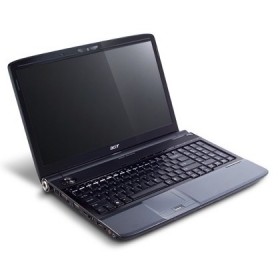
The sleek Aspire 6930 features the stunning and distinctive Acer Gemstone Blue design and performs as good as it looks thanks to Intel Centrino processor technology. Plus, your viewing will be better than ever thanks to the Acer CineCrystal 16" display. Go ahead, indulge yourself with the Aspire 6930 notebook!
The Acer CineCrystal display gives you true-to-life viewing, while second-generation Dolby Home Theater audio enhancement surrounds you with sound like you’ve never heard before from a notebook computer. You maintain total control of your multimedia experience thanks to the easy-to-use Acer MediaTouch interface. You get dual-core processor technology for daily multitasking plus a high-capacity hard drive. The 5-in-1 card reader makes it simple to share or transfer files, while the built-in webcam with Acer PrimaLite technology offers superior video performance even with low light.
Acer Aspire 6930 Notebook Detailed Technical Specifications:
| Operating System | Genuine Windows Vista Home Premium |
| Intel Centrino Processor Technology | Intel Core™2 Duo processor Mobile Intel GM45 Express chipset Intel Wireless WiFi Link network connection |
| Processsor | Intel Core™2 Duo Processor T6400 or Intel Core™2 Duo Processor T5800 (2MB L2 cache, 2.0GHz, 800MHz FSB) or Intel Core™2 Duo Processor P7350 (3MB L2 cache, 2.0GHz, 1066MHz FSB) |
| Chipset | Mobile Intel GM45 Express |
| Memory | Up to 4GB (2/2) DDR2 667 SDRAM User upgradeable up to 4GB (one 2GB memory card in each slot)* *If upgrading after initial purchase, one or more of the memory cards provided with the system may have to be replaced with optional larger memory cards in order to achieve the maximum capacity. |
| Storage | Up to 320GB* SATA hard drive Integrated variable-speed Super-Multi drive: -Read – 24X CD-ROM, 24X CD-R, 24X CD-RW, 8X DVD-ROM, 8X DVD-R, 8X DVD+R, 6X DVD-ROM DL (double-layer), 6X DVD-R DL (double-layer), 6X DVD+R DL (double-layer), 6X DVD-RW, 6X DVD+RW, 5X DVD-RAM -Write – 24X CD-R, 16X CD-RW, 8X DVD-R, 8X DVD+R, 4X DVD-R DL (double-layer), 4X DVD+R DL (double-layer), 6X DVD-RW, 8X DVD+RW, 5X DVD-RAM or Integrated Blu-ray Disc™ drive 5-in-1 card reader for optional MultiMediaCard™, Secure Digital card, Memory Stick, Memory Stick PRO™ or xD-Picture Card™ Optional external USB 1.44MB* floppy drive *When referring to storage capacity, GB stands for one billion bytes and MB stands for one million bytes. Some utilities may indicate varying storage capacities. Total user-accessible capacity may vary depending on operating environments. |
| Video | Acer CineCrystal 16.0" WXGA (1366 x 768) TFT LCD Up to 16.7 million colors Integrated Intel Graphics Media Accelerator 4500MHD or Discrete NVIDIA GeForce 9600M GS graphics Microsoft DirectX 10.0 support MPEG-2 DVD, WMV9/VC-1 (Windows Media Video 9, VC-1 standard) and H.264/AVC decoding VGA port and HDMI™ (High-Definition Multimedia Interface™) port with HDCP (high-bandwidth digital-content protection) support Support for simultaneous display on notebook LCD and external monitor |
| Audio | Acer PureZone technology with two integrated stereo microphones featuring beam-forming, echo-cancellation and noise-suppression technologies Second-generation Dolby Home Theater audio enhancement Two integrated stereo speakers One Acer Tuba CineBass booster supporting low-frequency effects Headphones/speaker/line-out with SPDIF support, microphone and line-in ports Microsoft DirectSound compatibility |
| Interface Ports | DC-in RJ-11 modem RJ-45 LAN VGA HDMI™ (High-Definition Multimedia Interface™) with HDCP (high-bandwidth digital-content protection) support (select models only) Headphones/speaker/line-out with SPDIF support Microphone Line-in CIR (consumer infrared) Three USB 2.0 |
| Card Slots | ExpressCard™/54 slot 5-in-1 card reader for optional MultiMediaCard™, Secure Digital card, Memory Stick, Memory Stick PRO™ or xD-Picture Card™ |
| Communications | Intel Wireless WiFi Link network connection supporting 802.11a/b/g/Draft N wireless LAN, Acer SignalUp technology for enhanced antenna efficiency Bluetooth 2.0 + EDR (enhanced data rate) wireless PAN (select models only) Gigabit LAN, Wake-on-LAN ready V.92 56Kbps* data/fax modem, PTT (postal, telegraph, telephone) certified in select countries, Wake-on-Ring ready Acer Video Conference with integrated Acer Crystal Eye webcam supporting Acer PrimaLite technology, which consists of a premium sensor, firmware and lenses to provide superior video performance under low-light conditions *Download speeds are limited to 53Kbps. Actual speeds may vary depending on line conditions. Uploads travel at speeds up to 33.6Kbps. Requires compatible digital sources. |
| Included Software | Acer Empowering Technology (eAudio, eRecovery, ePower, eSettings Management) Acer GameZone Acer GridVista Acer InstantOn Arcade Acer Launch Manager Adobe Acrobat Reader CyberLink PowerDirector™* McAfee Internet Security Suite * NTI Media Maker™* *OEM, not full-featured, version. |
| User Interface | 105-key keyboard, inverted T cursor layout, embedded numeric keypad, hotkey controls, 2.5mm minimum key travel, international language support 12 function, four cursor, two Windows keys; independent US dollar and Euro sign keys Empowering key Bluetooth (select models only), Acer InstantOn Arcade, Web browser, WLAN easy-launch buttons Volume control Play/pause, stop, previous, next media control Touchpad with four-way integrated scroll button |
| Dimensions & Weight | 15.2" (385.0mm) W x 10.9" (277.5mm) D x 1.6" - 1.7” (41.0mm – 43.9mm) H 7.5 lb. (3.4kg) Size and weight may vary depending on configuration |
| Power | 65-watt AC adapter Six-cell lithium ion battery: up to 2.5 hours life depending on configuration and usage (may be reduced if Windows Vista Aero is enabled) |
| Compliance | Wi-Fi CERTIFIED™ Energy Star |
| Security Features | User, administrator and hard drive BIOS passwords Kensington lock slot |
| Limited Warranty* | One-year parts and labor limited warranty* with concurrent International Traveler’s Warranty** *For a free copy of the standard limited warranty end-users should see a reseller where Acer products are sold or write to Acer America Corporation, Warranty Department, P.O. Box 6137, Temple, TX 76503. TFT displays commonly exhibit a small number of discolored dots, so-called “nonconforming pixels.” This phenomenon is a limitation of TFT LCD technology, not a product defect and, as such, is not covered by the limited warranty or by the upgrade programs. **Valid only in countries where Acer has an authorized repair facility. For a list of those countries go to http://global.acer.com/support/itw.htm. or call 800-816-2237. Services and response times may vary in countries outside the U.S. and Canada. Specifications are subject to change without notice. |
Acer Aspire 6930 Notebook Detailed Technical Specification
Howdy! I could have sworn I’ve been to this blog before but
after browsing through some of the post I realized
it’s new to me. Nonetheless, I’m definitely glad I found it and I’ll be book-marking and checking back often!
This has to be my second favourite piece in the last few days, i can’t let you know the top, it may offend you!