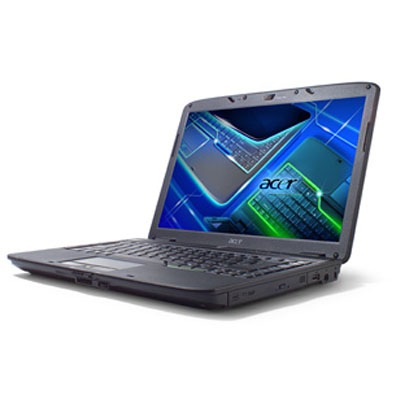
Acer Aspire 4730z Notebook Technical Specifications

Acer Aspire 4730z Notebook Introducing the Aspire 4730z on Intel’s Montevina platform. Product Positioning Promising richer multimedia entertainment experiences, the Aspire 4730z flaunts 14.1″ Acer CrystalBrite™ display, featuring the latest Intel® Pentium dual core processor and integrated Wi-Fi® functionality, delivers a feast of full sensory digital enjoyment on the road or at home.

Feature Highlights:
The Aspire 4730z offers the following features and benefits:
Digital-life delight, Building on the aesthetics of the original Aspire design, this new design Notebooks are uniquely cool, made to enrich digital life with ease, excitement and individuality.  The LCD cover is shaped with gradual curves, with a dark sub layer. The finish of the palm rest signifies refined taste and exacting technical prowess, complements the black keyboard, and highlights its brilliant elements.

Acer Aspire 4730z Notebook Technical Specifications:

Processor Intel® Pentium® dual-core mobile processor T3200 (1 MB L2 cache, 2.0 GHz, 667 MHz FSB, 35 W), supporting Intel® 64 architecture
Mobile Intel® GL40 Express Chipset
Acer InviLink™ Nplify™2, 3, 802.11b/g/Draft-N WiFi CERTIFIED® network connection, supporting Acer SignalUp™ wireless technology
Acer InviLink™3 802.11b/g WiFi CERTIFIED® network connection, supporting Acer SignalUp wireless technology
Operating System Linux
VGA 14.1″ WXGA high-brightness (200-nit) Acer CrystalBrite TFT LCD, 1280 x 800 pixel resolution, supporting simultaneous multi-window viewing via Acer GridVista
16 ms response time
Memory Dual-channel DDR2 SDRAM support
2 GB of DDR2 667 MHz memory, upgradeable to 4 GB using two soDIMM modules6
Graphics Mobile Intel® GL40 Express Chipset with integrated 3D graphics, featuring Intel® Graphics Media Accelerator 4500M (Intel® GMA 4500M) with up to 1759 MB of Intel® Dynamic Video Memory Technology 5.0 (64 MB of dedicated video memory, up to 1695 MB of shared system memory), supporting Microsoft DirectX® 10
Dual independent display support
16.7 million colors
External resolution/refresh rate:
2048 x 1536: 75/60 Hz
1920 x 1440: 85/75/60 Hz
1920 x 1200: 75/60 Hz
1920 x 1080: 100/85/75/60 Hz
1680 x 945: 100/85/75/60 Hz
1600 x 1200: 120/100/85/75/60 Hz
1600 x 900: 120/100/85/75/60 Hz
1400 x 1050: 85/75/60 Hz
1366 x 768: 85/75/60 Hz
1280 x 1024: 120/100/85/75/60 Hz
1280 x 960: 85/75/60 Hz
1280 x 768: 85/75/60 Hz
1280 x 720: 100/85/75/60 Hz
1024 x 768: 120/100/85/75/60 Hz
800 x 600: 120/100/85/72/60 Hz
MPEG-2/DVD decoding
WMV9 (VC-1) and H.264 (AVC) decoding
Acer Arcade™ Deluxe featuring Acer CinemaVision™ and Acer ClearVision™ technologies7
Audio Two built-in stereo speakers
High-definition audio support
MS-Sound compatible
Built-in microphone
Storage One 160 GB or larger hard disk drive8
5-in-1 card reader, supporting Secure Digital#153; (SD), MultiMediaCard (MMC), Memory Stick® (MS), Memory Stick PRO#153; (MS PRO), xD-Picture Card™ (xD)
Optical Disk Drive 8X DVD-Super Multi double-layer drive:
Read: 24X CD-ROM, 24X CD-R, 24X CD-RW, 8X DVD-ROM, 8X DVD-R, 8X DVD+R, 6X DVD-ROM DL (double-layer), 6X DVD-R DL (double-layer), 6X DVD+R DL (double-layer), 6X DVD-RW, 6X DVD+RW, 5X DVD-RAM
Write: 24X CD-R, 16X CD-RW, 8X DVD-R, 8X DVD+R, 4X DVD-R DL (double-layer), 4X DVD+R DL (double-layer), 6X DVD-RW, 8X DVD+RW, 5X DVD-RAM
Communication Acer Video Conference featuring:
Integrated Acer Crystal Eye webcam supporting enhanced Acer PrimaLite™ technology1
WLAN1, 3: Acer InviLink™ Nplify™2 802.11b/g/Draft-N WiFi CERTIFIED® network connection, supporting Acer SignalUp™ wireless technology
WLAN1, 3: Acer InviLink™ 802.11b/g WiFi CERTIFIED® network connection, supporting Acer SignalUp™ wireless technology
WPAN: Bluetooth® 2.0+EDR (Enhanced Data Rate)
LAN: Gigabit Ethernet, Wake-on-LAN ready
Modem: 56K ITU V.92 with PTT approval9, Wake-on-Ring ready
Dimensions and weight 340.4 (W) x 247 (D) x 22.9/42.3 (H) mm (13.4 x 9.7 x 0.9/1.6 inches)
2.4 kg (5.29 lbs.) with 6-cell battery
Power Supply ACPI 3.0 CPU power management standard: supports Standby and Hibernation power-saving modes
48.8 W 4400 mAh 6-cell Li-ion battery pack:
Upto 3.0-hour battery life10
2.5-hour rapid charge system-off
3.5-hour charge-in-use
3-pin 65 W AC adapter
ENERGY STAR 4.0
I/O Ports ExpressCard™/54 slot
5-in-1 card reader (SD™, MMC, MS, MS PRO, xD)
Two USB 2.0 ports
External display (VGA) port
Headphone/speaker/line-out jack
Microphone-in jack
Line-in jack
Ethernet (RJ-45) port
Modem (RJ-11) port
DC-in jack for AC adapter
Keyboard 88-/89-/93-key keyboard with inverted “T” cursor layout, 2.5 mm (minimum) key travel
Touchpad pointing device
12 function keys, four cursor keys, two Windows® keys, hotkey controls, embedded numeric keypad, international language support, independent US dollar and Euro symbol keys
Empowering Key
Easy-launch buttons: WLAN, Bluetooth, volume up and down
Media keys: Play/pause, stop, previous, next
Software Acer Empowering Technology (Acer ePower, eDataSecurity1, eRecovery, eSettings Management)
Acer Arcade™ Deluxe1 featuring Cinema, Album, Music, HomeMedia
Acer Crystal Eye1
Acer GridVista™
Acer Launch Manager
Acer GameZone1
Acer Video Conference Manager1
Adobe® Reader®
McAfee® Internet Security Suite
NTI Media Maker™
Microsoft® Works 8.5 with Office Home and Student 2007 Trial
Options and Items Acer Xpress VoIP phone and Acer Video Conference Manager pack
512 MB/1 GB/2 GB DDR2 667 MHz soDIMM module
6-cell Li-ion battery pack
3-pin 65 W AC adapter
External USB floppy disk drive
Warranty One-year International Travelers Warranty (ITW)
Security BIOS user, supervisor, HDD passwords
Kensington lock slot
Note Acer recommends Windows Vista® Home Premium.
1.Specifications vary depending on model.
2.Acer InviLink™ Nplify™, a high-throughput wireless solution, delivers superior performance and reliable connections while enabling emerging voice, video and data applications. Wi-Fi CERTIFIED®, it supports Acer SignalUp™ wireless technology and is compliant with 802.11a/b/g/Draft-N and 802.11b/g standards.
3.Actual throughput may vary depending on network conditions and environmental factors such as network traffic or overhead, building construction and access point settings.
4.Up to 1 GB of available system memory may be allocated for system resource requirements.
5.Shared system memory may be allocated to support integrated graphics, depending on system memory size and other factors. Actual system memory available to the operating system will be reduced by the amount of dedicated and shared system memory utilized by the graphics solution and resources required by the operating environment.
6.A 64-bit operating system is required to enjoy the ultimate performance of 4 GB memory.
7.Powered by CyberLink® technology.
8.1 GB is 1 billion bytes. Actual formatted capacity is less and may vary depending on preloaded materials and the operating environment. Acer eRecovery Management utilizes up to 10 GB of the stated hard disk capacity as dedicated backup space.
9.PTT countries: Asia: China, Hong Kong, Japan, Korea, Malaysia, Singapore, Taiwan. Europe: Austria, Belgium, Denmark, Finland, France, Germany, Greece, Holland, Iceland, Italy, Luxembourg, Norway, Portugal, Spain, Sweden, Switzerland. Oceania: Australia, New Zealand. N. America: Canada, USA.
10.Battery life varies depending on product specifications, computer settings, and applications or features launched, and may be reduced if Windows Aero™ is enabled. All batteries’ maximum capacity diminishes with time and use.
In a continuing effort to improve the quality of our products, information in this document is subject to change without notice. Images shown are only representations of some of the configurations available for this model. Availability may vary depending on region.
As a phenomenon known to thin-film transistors (TFTs), liquid crystal displays (LCDs) commonly exhibit a small number of discoloration dots, as so-called “non-conforming pixels.” This phenomenon is a limitation of TFT LCD technology, not a product defect, and as such is not covered by Acer’s warranty.
2008 Acer Inc. All rights reserved. Acer, the Acer logo, and Aspire are registered trademarks of Acer Inc. Other trademarks, registered trademarks, and/or service marks, indicated or otherwise, are the property of their respective owners.

\\ Tags: , , , ,


Related posts

Comments

64 Responses to “Acer Aspire 4730z Notebook Technical Specifications”

  1. WTS: Acer Aspire Notebook 4730z $320 - INGunOwners on May 19th, 2009 8:22 PM

    [...] Acer Aspire Notebook 4730z $320 Bought early 2009. Here are the specs. Acer Aspire 4730z Notebook Technical Specifications | Notebook Drivers [...]

  2. tonja on July 22nd, 2009 5:34 PM

    my mouse is not working,,,,,

    [Reply]

  3. tonja on July 22nd, 2009 5:35 PM

    where do i find the button to control the mouse

    [Reply]

    krishna gopal reddy Reply:

    fn f7

    [Reply]

  4. saleemuddin on September 25th, 2009 7:19 AM

    Press Fn+F7 keys to enable & disable mouse

    [Reply]

  5. luis on September 28th, 2009 8:27 AM

    thanks saleemuddin

    [Reply]

  6. aminjy on October 2nd, 2009 11:41 PM

    i cannot find the drivers for Acer Nplify 802.11b/g/Draft-N Wlan.I bought acer aspire 4736z the is no driver for Acer Nplify 802.11b/g/Draft-N Wlan. Please help me. send to my mail

    [Reply]

  7. slyvia on October 7th, 2009 6:10 PM

    my bluetooth button/ device cannot detech

    [Reply]

  8. Shaun on October 7th, 2009 11:15 PM

    Hi!,
    me too,since i bought mine, i neva used the bluetooth. It just tells me “No bluetooth device!
    Do i require a certain software?..or how do i activate it?

    [Reply]

  9. tim on October 18th, 2009 6:31 PM

    Acer was kind enough to include a Bluetooth **button** featuring the universally recognized Bluetooth symbol on all of its Aspire 4730z notebooks, but a Bluetooth **module** in only some of them. Gee, thanks Acer! I was loving Acer until a realized that they pulled bait and switch on me and quite a few other other people with the Bluetooth. The computer was still a great price and value – but this still seems slimy to me.

    [Reply]

  10. julius on October 28th, 2009 11:03 PM

    (Device to PC) to work on your bluetooth.. turn it on.. when you see the bluetooth icon on the lower right. right click on it and click Receive file… then send a file.. and if you are going to send from PC to DEVICE simply turn on both the bluetooth and send it!

    [Reply]

  11. Gabriel on November 1st, 2009 1:19 PM

    why does it show 2 hardrive in the my computer menu .. could it be becsuse it has 2 hardrives?
    the specs say a 320gb hdd but it dnt say 2 of them>>

    [Reply]

  12. Arun on November 2nd, 2009 12:29 PM

    hii

    I have reinstalled winodws vista after that my display is not so good. (1024 x 764 pixels . how can How can i increse it?

    my bluetooth, wirelesLan etc not working. how caN instal it.? can anyone help?

    arun.thomas111@gmail.com

    [Reply]

    krishna gopal reddy Reply:

    fn+left arow and right arow to increse or decrese
    bluetooth and wirlesslan etc, by defolt no need 2 instal
    and one more think is what is ur os by befolt if it is vista or XP
    see if vista meens no need to instal
    XP .. u have 2 download all drivers for Xp

    [Reply]

  13. lee on November 23rd, 2009 2:31 AM

    what is the button to activate the webcam of acer 4730z laptop

    [Reply]

    krishna gopal reddy Reply:

    thre is no button to activate u just instal soft ware or else.. mycomputer>program fils>acer >crystaleye. just clik on that

    [Reply]

  14. joel aguirre on November 26th, 2009 6:48 PM

    my usb port not working

    [Reply]

  15. joel aguirre on November 26th, 2009 6:50 PM

    my usb port not working aspire 4730z

    [Reply]

  16. krishna gopal reddy on December 11th, 2009 6:25 PM

    hye plz help me
    my lapi battery giving a messege 2 me like this consider replace your battery
    what i do ?
    i have 3 months waranty olso
    but my lapi is made in kuwait

    [Reply]

  17. krishna gopal reddy on December 11th, 2009 6:28 PM

    hye plz help me
    my lapi battery giving a messege 2 me like this “consider replace your battery”
    what i do ?
    i have 3 months waranty olso
    but my lapi is made in kuwait
    plz reply me 2 my mailid :krishna217@gmail.com

    [Reply]

  18. mahid on December 14th, 2009 9:05 PM

    hi pwd pband gumana ung blutoth divice ng acer 4730z

    [Reply]

  19. danish bazmi on December 16th, 2009 6:51 AM

    hey my dvd rom is not working and its my last month to warranty,,,from i get driver for aspire 4730z,i am using windows vista.

    [Reply]

  20. mark thomas on December 17th, 2009 2:34 AM

    I am trying to connect to wireless on my 4730z but can not find how to do this. Do I need to install wireless drivers?? Confused!

    [Reply]

    Anand Reply:

    Dear
    We have to install Wireless LAN Driver,if u hav Vista OS,no need.If Xp have to install driver.ok

    [Reply]

  21. megat on December 18th, 2009 1:10 AM

    how to activate bluetooth on my acer 4736z

    [Reply]

    Me Reply:

    Press the button right next to the left shift and the left control button.

    [Reply]

  22. albab on December 31st, 2009 4:33 AM

    how to activate bluetooth on my acer 4736z.when i press bluetooth button,the light not on(mean not activated) not like wifi button..blinking(mean activated) it’s normal..or i’ve to install the bluetooth driver..please help

    [Reply]

    Anand Reply:

    Dear
    First check Device manager there is Bletooth driver is installed ?or install proper driver..

    [Reply]

    Fou_Lu Reply:

    you don’t have any bluetooth hardware installed in your laptop, that’s why when you press the button it says no bluetooth device detected

    [Reply]

    wanying Reply:

    so how can only install the bluetooth device??

    [Reply]

  23. Nirmal Gautam on January 1st, 2010 7:41 PM

    I have just installed 32-bit Windows 7 in my 4730z notebook. I need some drivers like launchmanager and Wireless Lan . Where can I find them?

    [Reply]

    Fou_Lu Reply:

    go here

    http://support.acer-euro.com/drivers/downloads_gd.html

    that’s for windows 7 starter if your version is home, pro or ultimate change at the OS tab

    [Reply]

  24. charlene pedroso on January 20th, 2010 9:00 AM

    Ola eu tmb adquiri o notebook acer aspire 4730z,achei ele maravilhoso,a unica coisa q ainda eu não consegui encontrar nele e o acento agudo.Alguem pd me ajudar.obrigada

    [Reply]

  25. charlene pedroso on January 20th, 2010 9:03 AM

    Ola eu tmb adquiri o notebook acer aspire 4730z,ele e maravilhoso,a unica coisa q não consegui encontrar nele e o acento agudo.Alguem pd me ajudar?obrigada

    [Reply]

  26. Bijesh Amatya on January 22nd, 2010 1:09 AM

    Guys, Planning For OPERATING SYSTEM SWICH FOR aCER ASPIRE 4730Z brought early this morning From FreeDos to Windows Ultimate version PLS ADVICE

    [Reply]

  27. slash on January 27th, 2010 6:07 AM

    my cd rom drive it was an error update..,,,the update 64 byte was there….any body have late version? help me please

    [Reply]

  28. brando f perez on February 1st, 2010 9:00 PM

    I pay warranty i have an accident with de screen is broke my warranty fix that?I buy this one in offise depot

    [Reply]

  29. alex kanaya on February 3rd, 2010 5:15 AM

    I tried to use expresscard 34 firewire, conected to audio soundcard M-audio 410. All instalation was ok, setup ok. But not worked? Maybe u can help me 4 this problem. Thx alot. Gbu

    [Reply]

  30. MICHAEL S. OLIPHANT on February 4th, 2010 1:34 PM

    MY SCREEN IS NOT COMING ON……… WHAT CAN I DO>?????

    [Reply]

  31. Rob on March 10th, 2010 2:39 AM

    Friends,
    I bought my 4730z laptop today, and didn’t check it the store but now when i see there is no built in webcam, at the surface of the screen,so is it all the same, there is no built in webcam in all 4730z laptops?

    [Reply]

    Gary C Reply:

    It was a bate & switch @ Bestbuys, Jensen Beach FL.
    The floor model listing had it. The owner manual list it. I never had use for it untill now a year later when my grand kids got web cams and asked me to use it. This is when I found out it doesnt have it. Went out and bought a Logitech webcam it works great. Very angry with Bestbuys for the bate & switch.

    [Reply]

  32. carl on March 26th, 2010 5:28 AM

    how do i show my pictures on my tv

    [Reply]

  33. Hoosh on April 3rd, 2010 4:22 AM

    Switched on my 4730Z this morning and nothing happens, no screen no starting sound but there is light on the start button and the battery LED. Cable is ok too. Any ideas?

    [Reply]

    Gary C Reply:

    Try holding down the Fn key and hit the F5 or F6 key

    [Reply]

  34. joseph on April 6th, 2010 4:06 AM

    i recently changed windows from vista to windows 7 and now my up and down keys on the keyboard are not working. I do not have the acer empowering technology driver. I possess an Acer notebook aspire 4730Z. tell me what to do?

    [Reply]

  35. Henry Koech on April 21st, 2010 1:01 AM

    i wish to know more about the aspire 4730z wireless adapter

    [Reply]

  36. shukla on April 30th, 2010 11:42 AM

    hey can any one help me?
    my lappy is showing media test faliure, check cable.

    [Reply]

  37. khai on May 3rd, 2010 5:28 PM

    hai… why my screen concussion/rocking….
    and why my cmpter restart when i open every 20 mnt.
    pls help me…

    [Reply]

  38. Richard Shand on May 12th, 2010 10:30 PM

    The ‘backslash’ key gives a ‘hash’ or a ’squiggle’. How do I enable a ‘backslash’ because its pretty important for website work.

    [Reply]

    ayesha Reply:

    did you find a solution to this problem?? I am struggling with the same on Gateway laptop

    [Reply]

  39. rhey on May 24th, 2010 3:11 AM

    how to activated bluetooth on Acer Aspire 4730z??

    [Reply]

  40. anurag on May 26th, 2010 10:15 PM

    drivers of sound nd wifi, nd card reader always have problem to find nd no service provides by acer company

    [Reply]

  41. Emanuel Costa on May 29th, 2010 3:49 PM

    My acer 4730Z keyboard doesn’t work. The computer starts fine but when I try to write the password it will not do anything.
    Does anybody knows what is going own?
    Thanks

    [Reply]

  42. Suresh Mishra on June 4th, 2010 9:08 AM

    When I type, the curser leaves the place and jumps elsewhere, with the result that while typing without seeing the monitor, matter is typed elsewhere. So I have to type with Fn+F7 i.e. making the curser defunct. Is it the manufacturing defect? Pl.guide.

    [Reply]

  43. Gary C on June 6th, 2010 12:24 PM

    The palm of you hand is hitting the mouse pad as you type.
    Disengage it FN & F7 then us a usb mouse.

    [Reply]

  44. ayie on June 23rd, 2010 8:37 AM

    i need the driver for Easy-launch buttons for 4736z laptop. Pls guide me.

    [Reply]

  45. ayie on June 23rd, 2010 8:39 AM

    what is the name of the driver for 4736z easy-launch button.

    and…. my optical driver isnt working when i switch to windows 7 ultimate from vista. anyone can help??

    [Reply]

  46. IDIOT on July 2nd, 2010 1:44 PM

    can someone help me why i cannot install audio driver (acer aspire 4730z), when i install got problem something like number , after that automatic close… someone plz help me

    [Reply]

  47. What plugins should I use? - Emuforums.com on July 10th, 2010 9:16 AM

    [...] What plugins should I use? I am trying to set up ePSXe but none of the plugins I can find are using will work, does anyone know which I should use? I'm using an Acer Aspire 4730z running Windows 7 Business (32-bit). Here's a link to the specs of my computer: Acer Aspire 4730z Notebook Technical Specifications | Notebook Drivers [...]

  48. anurag on July 11th, 2010 1:22 AM

    driver not found i m in problem widout drivers of cardreader, wifi, and many more

    [Reply]

  49. Narendra on July 22nd, 2010 8:59 AM

    Hi guys this is narendra …i have a doubt regarding the mouse pad in acer 4730z that how to use the scroll bar options without moving the cursor to the scrollbar…

    [Reply]

  50. zul on August 8th, 2010 8:16 AM

    graphic card for my aspire 4730z are ati radeon hd3470 256mb..can i change or upgrade my grapic card only…

    [Reply]

  51. zul on August 8th, 2010 8:17 AM

    graphic card for my aspire 4730z are ati radeon hd3470 256mb..can i change or upgrade my grapic card only…if can how can i do it…

    [Reply]

  52. shena on August 27th, 2010 1:16 AM

    hi. thanks for sharing. firiend

    [Reply]

Leave a Reply


Add to Technorati Favorites Software Blogs - Blog Catalog Blog Directory